Every stylist dreads the sound of the phone ringing as you’re applying a complex balayage or during a high-stakes consultation. Even though the call may be a good sign for business, for a busy stylist it’s also an interruption that costs time and breaks focus.
The goal for a more efficient salon business is clear: transitioning from manual to automated scheduling. If you want to know how to get potential customers to book appointments with you, the answer is simple: remove the friction and meet them where they spend their time, on their phones.
In a fast-paced beauty industry, every phone call you take while behind the chair is a moment of divided attention. It interrupt your creative flow and creates a bottleneck for your business. When you are on the phone, you aren't providing a service, and when you are providing a service, you aren't answering the phone. This "scheduling gap" is where potential revenue slips through the cracks.
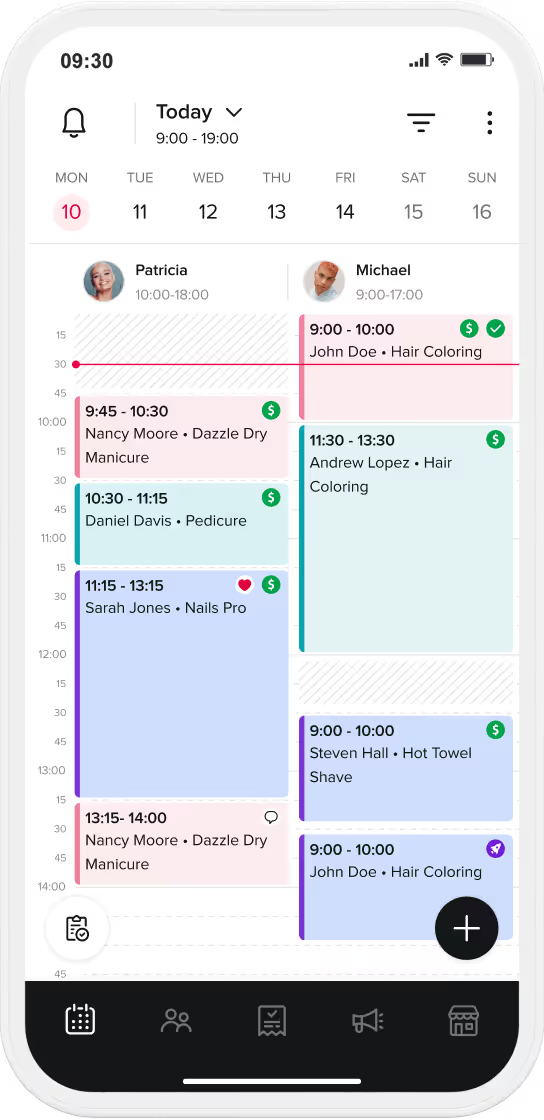
Transitioning your business to a digital-first approach is about more than just technology; it’s about optimizing your salon culture and your bottom line. By moving your calendar to the cloud, you essentially hire a virtual receptionist that never sleeps, never gets tired, and never makes a mistake with a time slot. The benefits of switching are more than a convenience, they are a strategy.
Reduced No-Shows: Automated reminders (a core Booksy feature) are significantly more effective than manual calls, reducing the chance of forgotten appointments without you lifting a finger.
Stopping the phone calls requires a proactive approach. You need to guide your clients toward the online booking experience by making it visible, attractive, and undeniable at every touchpoint of their journey. Follow these practical steps to move your clients from calling to clicking.
Your clients live on Google and Instagram. Use the Booksy on Google integration to place a "Book Now" button directly on your Google Maps listing. This turns a simple search into a confirmed sale in seconds. Don’t forget to add your booking link to your Instagram and Facebook bios, make it the first thing your customers see.
To speed up getting bookings, you may need to nudge your clients. While you work on transitioning them to the app, you can use Booksy Promotions to create a Flash Sale or Happy Hours discount for specific days. Promote these on social media with the message: "New slots available! Book online this week and get 10% off using our link." You can also use Booksy Boost to increase your visibility in the marketplace to find new clients.
This is a tactical game-changer. Change your voicemail greeting to say:
"Hi! We are currently with clients and can’t take your call, but you can see our real-time availability and book instantly at [Your Booksy Link]. It’s the fastest way to secure your spot!"
Modern online booking is about more than just picking a date. It’s about creating a seamless, secure transaction that protects your business from the common pitfalls of the service industry. To truly let clients book appointments online with confidence, you need to provide a high-value experience that makes them feel secure and excited about their upcoming visit.
Clients are more likely to commit when the process is seamless. By using Booksy Pay, you can implement No-Show Protection. When clients book online and know a deposit or a card is on file, they take the appointment more seriously. It’s the best way to accept client appointments online while securing your income.
The easiest way to let clients book appointments online is to encourage them to use the Booksy app. Once it’s on their phone, you are just one tap away. It’s much faster for a client to open an app than to search for your phone number and wait for you to pick up.
This table compares the efficiency of modern digital booking against traditional manual methods.
If you want to maximize your chair's occupancy, consider using the tools at your disposal to create a sense of urgency and accessibility. Online booking allows you to play "offense" with your schedule, filling gaps before they even happen. Here is how to keep your calendar active even during the busiest or slowest of times.
Don't let a full calendar turn people away. If a client sees you are busy, Booksy’s Waitlist feature allows them to sign up for a spot. If someone cancels, the system does the work for you, notifying potential customers immediately.
Use your social media to act as a live billboard. Post "Last-minute opening" stories on Instagram with a direct link to that specific time slot. This creates urgency and shows clients that the online system is the "source of truth" for your availability.
Every business has the potential of loyal clients who may be resistant to new technology. The key here is not to force them, but to show them how much easier their life will be once they make the switch. It’s about framing the technology as a premium service designed specifically for their convenience.
Online booking isn't just a convenience for your clients; it's freedom for you. By choosing the right tools to let clients book appointments online, you reduce stress, eliminate double-bookings, and ensure your business grows even when you aren't looking at your phone.
Ready to stop the phone tag? Discover how Booksy Biz can automate your calendar and fill your chairs today!
Don't force them; show them. While they are in your chair, demonstrate the app's convenience and explain that they can choose their own time and receive automated text reminders as a premium service.
Actually, it reduces them. Features like No-Show Protection (deposits or card-on-file) and automated reminders ensure clients are both financially committed and well-informed.
Yes. You define your availability, processing times, and breaks. The online system simply acts as a 24/7 filter that only allows bookings during the slots you have designated as "open."
The Waitlist feature allows clients to sign up for notification. If a spot opens up, the system automatically alerts those on the list, filling your chair without you having to lift a finger.