What is the best system for barbers to keep track of revenue streams and expenses?
In 2026, the economy continues to shift away from cash, requiring barber shops to have a sophisticated digital system powered by software designed to support professional barbers.
Mastering the finances of owning a barbershop requires a deep understanding of how integrated POS systems work. This guide provides a technical framework for optimizing your shop’s profitability to help you make the most from every chair in the shop.
Looking beyond daily cash flow and creating systems for long-term planning is necessary for sustainable growth. By using advanced barber software with secure payment processing, you eliminate the revenue leaks caused by no-shows, manual accounting errors, and unorganized inventory. Whether you are navigating the complexities of booth rental vs. commission models or seeking to implement automated deposits, this comprehensive guide serves as your financial roadmap.
The Foundations of Barbershop Financial Health
A successful barbershop is not measured solely by the number of cuts, but by its Net Profit Margin. Many owners fall into the trap of "Busy Fool Syndrome"—having a full shop but zero cash at the end of the month due to unoptimized overhead and thin margins. Understanding the foundational math of your shop allows you to make decisions based on real data on when to hire, when to raise prices, and how to allocate your marketing budget. By using barber software to track these metrics in real-time, you move from guesswork to precisie management.
Understanding Barbershop Profit Margins: Service vs. Retail
The most profitable barber shops treat their retail shelf as a second, passive barber. While services (haircuts/shaves) carry high labor costs, retail products (pomades/oils) offer a scalable revenue stream with minimal time investment.
- Service Margins: These are limited by time and staff commissions. If a $40 cut takes 45 minutes and you pay 50% commission, your gross margin is already capped before rent and utilities.
- Retail Margins: Selling a $25 pomade that costs you $12.50 results in a 50% margin with zero labor. Mastering the attach rate (the percentage of clients who buy a product) with your software's checkout prompts is the fastest way to increase shop profitability.
Break-Even Analysis: How Many Cuts Do You Need to Stay Profitable?
Every shop owner must know their Break-Even Point (BEP). This is the exact dollar amount or number of services required to cover all fixed and variable costs.
- Fixed Costs: Rent, insurance, internet, and basic utilities.
- Variable Costs: Back-bar supplies (neck strips, blades, alcohol), marketing spend, and labor commissions.
- The Calculation: Divide your total monthly fixed costs by your average profit per service. If your fixed costs are $4,000 and you profit $20 per cut after commission and supplies, you need 200 cuts per month just to reach zero.
Pro Tip: Modern barber software automates this calculation by cross-referencing your expense logs with real-time booking data, showing you exactly which day of the month you hit the green.
Table: The Barbershop Profitability Matrix
| Revenue Stream |
Typical Gross Margin |
Labor Intensity |
Scalability |
Key Metric |
| Standard Haircut |
40% - 60% |
High |
Low (Time-bound) |
Services per Day |
| Premium Shave |
50% - 70% |
High |
Low (Manual) |
Upsell Rate |
| Retail Products |
45% - 55% |
Zero |
High (Unlimited) |
Attach Rate |
| Memberships |
80%+ |
Low |
Medium |
MRR (Recurring) |
Cash Flow Management: Navigating the Daily Revenue Cycle
Cash flow is the movement of money in and out of your business. A shop can be profitable on paper but fail because the cash is tied up in unpaid invoices or unsold inventory.
- The Daily Cycle: Integrated barber software provides real-time reporting, allowing you to see exactly how much cash is hitting your bank account daily versus what is pending in credit card processing.
Inventory Turn: Don't let your cash sit on the shelf in the form of dusty bottles. Use your software to track your inventory turnover rate to ensure you are only buying what you can sell within 30–60 days.
Modern Payment Processing: Beyond the Cash Drawer
Modern payment processing for barbers has evolved from a simple cash drawer into a secure, software-integrated financial environment. For a shop owner, the goal is threefold: transaction speed, data security, and low processing friction. If your payment system isn't seamlessly integrated with your barber software, you are losing hours every week to manual reconciliation and increasing the risk of human error.
The Shift to Contactless: Why Digital Payments are Game Changing
Consumer have shifted to contactless payments (NFC) as the preferred way to make payment. Whether via physical card, Apple Pay, or Google Wallet, clients expect a tap-and-go experience that is fast and professional.
- Speed of Service: Digital transactions take seconds, accelerating "chair turn" and reducing front-desk congestion.
- Safety and Hygiene: Minimizing physical cash exchange remains a standard expectation in premium grooming environments.
- Automatic Data Capture: By processing payments through your barber software, you automatically capture client spending habits, allowing for more precise marketing and CRM loyalty triggers.
Integrated vs. Standalone Payment Terminals: A Cost Comparison
Many shops still use standalone terminals—devices that aren't connected to the booking computer. This is a significant financial bottleneck and a primary source of revenue leakage.
- Standalone Terminals: Require the barber to manually type the price into the reader. This leads to "typo leaks" (e.g., charging $3.50 instead of $35.00) and makes end-of-day balancing a manual nightmare.
- Integrated Barber Software: The amount is pushed directly from the appointment screen to the terminal. There is zero room for error, and the transaction is automatically logged against the client’s profile and the barber’s commission report.
Table: Integrated vs. Standalone Payment Systems
| Feature |
Standalone Terminal |
Integrated Payment (e.g., Booksy) |
| Manual Data Entry |
Required (High Error Risk) |
Automated (Zero Error Risk) |
| End-of-Day Balancing |
30-60 Minutes Manual Work |
Instant & Automatic |
| Tipping Prompt |
Standard / Basic |
Optimized for High % Tips |
| Client Data Sync |
None |
Full History & Preferences |
| Revenue Protection |
Post-Service Only |
Deposits & Cancellation Fees |
Processing Fees Explained: Flat-Rate vs. Interchange Plus
Protecting your profit margin requires understanding merchant service fees. Every swipe costs money; the goal is to ensure those costs are transparent.
- Flat-Rate Pricing: A fixed percentage (e.g., 2.6% + $0.10) regardless of the card type. It is simple, predictable, and easy to account for in your barber software reports.
- Interchange Plus (IC+): You pay the wholesale cost of the card (Interchange) plus a small markup. This can be cheaper for high-volume shops but is more complex to track.
- Hidden "Junk" Fees: Professional software solutions eliminate statement fees and hardware rental costs that often eat into the profits of a $40 haircut.
Security and Compliance: Ensuring PCI Compliance
Handling credit card data comes with legal responsibilities. Your barber software acts as a shield, ensuring you stay PCI DSS compliant without the technical headache.
- Tokenization: Modern systems use tokenization, meaning actual card numbers are never stored on your hardware—only a secure token exists, protecting you from data breaches.
- Fraud Protection: Advanced integrated systems use AI to detect chargeback risks before they affect your bottom line, ensuring your revenue is as secure as your shop’s vault.
Choosing the Right Barber Software & POS Integration
A Barbershop POS (Point of Sale) system is no longer just a digital cash register; it is the central nervous system of your business operations.
In 2026, the best systems are those where the hardware and the barber management software are perfectly synced. When you choose an integrated solution, you aren't just buying a card reader—you are investing in a tool that bridges the gap between financial transactions and operational efficiency.
The Power of Integration: Why "All-in-One" Wins
Using separate systems for booking and payments creates a data silo. An integrated POS within your barber software eliminates these silos, offering three critical business benefits:
- Automatic Reconciliation: Your software automatically matches every payment to a specific appointment, saving hours of manual accounting.
- Unified Client Profiles: You can see exactly how much a client has spent on services versus products over their lifetime directly in their profile.
- Reduced Human Error: Since the total is sent directly from the software to the terminal, there’s no risk of a barber mistyping a price during a busy shift.
Core Features of a High-Performance System
To maximize your shop’s financial health, your integrated barber software must include:
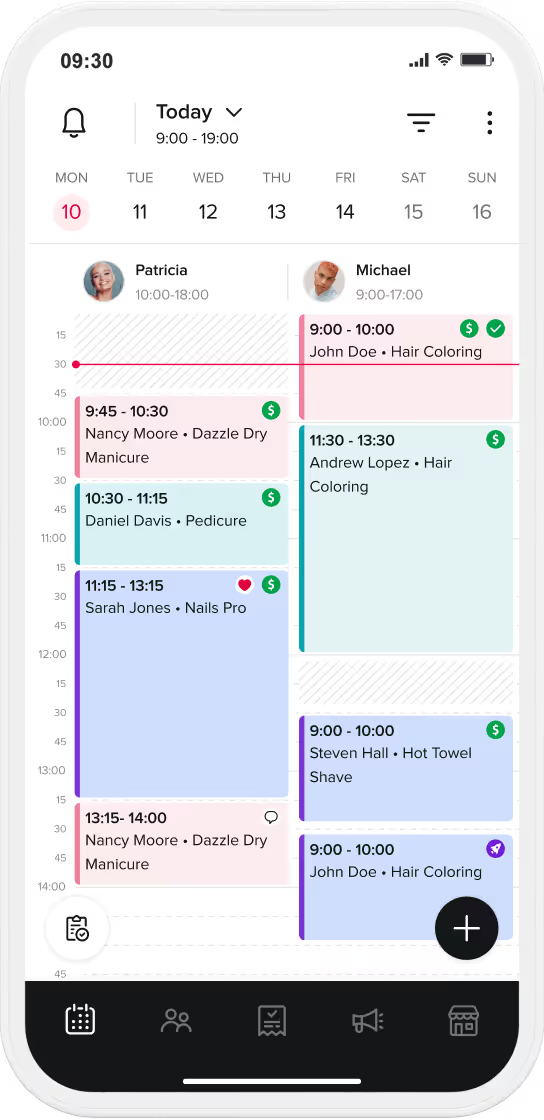
- Real-Time Sales Reporting: Access your "Total Sales," "Average Ticket Value," and "Revenue per Staff Member" from your smartphone at any moment.
- Integrated Payroll and Commissions: The software should automatically calculate what each barber has earned (including tips) based on your specific shop rules (e.g., 50/50 splits or tiered commissions).
- Automated Inventory Management: Every time a product is scanned at checkout, the software should deduct it from your stock and alert you when it's time to reorder.
Hardware Requirements: Sleek, Mobile, and Reliable
The physical setup of your shop impacts your brand's professional image. Modern integrated hardware is designed to be wireless and clutter-free.
- The Hub (Tablet/iPad): Most modern shops use a tablet as the primary interface. It’s portable, allowing barbers to check out clients directly at the chair, which is proven to increase the likelihood of a rebooking.
- Integrated Card Readers: These devices handle NFC (tap), Chip (EMV), and digital wallets like Apple/Google Pay, feeding data directly back into the software engine.
- Customer-Facing Displays: Allowing clients to see their bill and select a tip percentage on a dedicated screen increases transparency and typically boosts average tip amounts by over 15%.
Table: POS Hardware vs. Software Integration Checklist
| Component |
Essential Features to Look For |
Business Impact |
| Integrated Software |
Cloud-based, Real-time sync, Mobile access |
Remote management & data security |
| Card Reader |
NFC & EMV support, Battery-powered |
Transaction speed & professional image |
| Reporting Engine |
Exportable CSVs, Automated P&L |
Simplified accounting & tax readiness |
| Inventory Tracking |
Barcode scanning, Low-stock alerts |
Prevents lost retail revenue |
Data-Driven Decision Making: Turning Transactions into Insights
The true value of integrated barber software lies in its ability to turn raw transactions into actionable business intelligence.
- Average Ticket Value (ATV): If your software shows an ATV of $45 while your haircut is $40, it confirms your team is successfully upselling products or add-on services.
- Product Turn Rate: This metric tells you how fast you are moving retail inventory, ensuring your cash isn't "trapped" in unsold products.
Managing Operating Expenses (OpEx) and Overhead
Profitability is not just about what you earn; it is about what you keep. Operating Expenses (OpEx) are the recurring costs required to run your barbershop, and without strict oversight, they can quickly erode your margins. In 2026, successful owners use barbershop financial analytics within their software to categorize every dollar spent. By mastering your overhead, you ensure that as your revenue grows, your profit scales with it.
Labor Costs: Commission vs. Booth Rental Models
Labor is typically a barbershop's largest expense. The financial model you choose dictates your shop's cash flow stability and tax obligations.
- The Commission Model: You pay the barber a percentage of their service revenue (e.g., 50/50 split). This aligns your costs with your revenue—if there are no clients, you have no labor cost. However, it requires precise tracking. Integrated barber software automates these splits, including deductions for back-bar supplies or credit card fees.
- The Booth Rental Model: Barbers pay a flat weekly or monthly "rent" to use the chair. This provides the shop owner with Guaranteed Fixed Income, but it caps your upside potential during busy periods.
Fixed Costs vs. Variable Costs: Rent, Utilities, and Supplies
Understanding the difference between these two categories allows you to identify exactly where to "trim the fat" when margins are tight.
- Fixed Costs (Static): These remain the same regardless of how many clients you cut. This includes rent, insurance, and your barber software subscription. The goal is to keep these as low as possible as a percentage of your total revenue.
- Variable Costs (Dynamic): These fluctuate based on volume. Back-bar supplies (shampoo, blades, capes) and payment processing fees are variable. High-volume shops can often negotiate better rates or use bulk-ordering features within their management system.
Table: Monthly Expense Benchmark (Industry Standards)
| Expense Category |
Recommended % of Revenue |
Management Strategy via Software |
| Rent & Lease |
10% - 15% |
Fixed cost tracking |
| Labor (Commission) |
40% - 55% |
Automated payroll & split calculation |
| Supplies & Inventory |
3% - 7% |
Automated stock alerts & usage tracking |
| Marketing & Ads |
2% - 5% |
Tracking ROI per campaign |
| Utilities & Insurance |
3% - 5% |
Monitoring monthly overhead |
Tax Planning: Deductions and Record Keeping
Tax season should not be a financial crisis for a barbershop. Proper financial management involves consistent record-keeping to maximize legal deductions.
- Deductible Expenses: Almost every operational cost is deductible, including equipment repairs, professional training, and your software fees.
- The Software Advantage: Instead of a "shoebox of receipts," a modern integrated system allows you to export "tax-ready" reports and P&L statements. This saves you thousands in accounting fees and ensures your records are audit-proof.
Reducing Financial Leakage: No-Shows and Cancellations
In the personal care industry, time is your most valuable currency. Financial leakage from no-shows can cost a busy barbershop between $500 and $2,000 per chair, per month. In 2026, professional shops eliminate this risk by shifting from a trust-based booking system to a contractual financial agreement enforced by the barber software.
The True Cost of an Empty Chair
Most owners underestimate the cumulative effect of cancellations. If your average service is $40 and you have just three no-shows per week, you are losing over $6,000 in annual gross revenue per barber.
- The Opportunity Cost: Unlike retail products, you cannot sell yesterday's empty time slot today.
- Staff Morale: Frequent no-shows frustrate high-performing barbers, leading to staff turnover and a breakdown in shop culture.
- Operational Drag: Cancellations disrupt the workflow, leaving staff idle while overhead costs (electricity, rent, software) continue to accrue.
Implementing Financial Safeguards via Software
A firm cancellation policy signals professionalism. It educates the client that your time has a value. Integrated barber software makes enforcing these policies frictionless.
- The 24-Hour Rule: Standard industry practice is to require at least 24 hours' notice for a cancellation.
- Integrated Prepayments & Deposits: The most effective way to stop no-shows is to require a deposit at the time of booking. By using integrated payments, your software holds the card on file securely, ensuring that if a client flakes, you can still collect a percentage of the service fee to cover labor and overhead.
Table: Financial Impact of Cancellation Strategies
| Booking Method |
Avg. No-Show Rate |
Revenue Protection |
Client Accountability |
| Manual (Phone/DM) |
15% - 25% |
0% (Total Loss) |
Low |
| Online (No Deposit) |
10% - 15% |
0% (Total Loss) |
Medium |
| Card on File Policy |
3% - 5% |
50% - 100% |
High |
| Full Prepayment |
< 1% |
100% (Guaranteed) |
Maximum |
Automated Deposits: Securing Revenue in Advance
Modern integrated POS and software systems allow you to automate the uncomfortable part of the business. By requiring a deposit, you filter out window shoppers and make sure that only serious clients occupy your calendar.
- Frictionless Experience: The deposit is handled during the digital booking process, so it feels like a natural part of the service.
- The Psychology of Sunk Cost: Once a client has paid even a small amount upfront, the likelihood of them missing the appointment drops by over 90%.
- Automatic Payouts: Ensure your system handles the "no-show fee" automatically so your barbers don't have to have awkward financial conversations with clients at their next visit.
Financial Reporting: Data-Driven Decision Making
In the modern personal care industry, gut feeling is not a viable business strategy. Decisions driving by data use your shop's historical financial data to predict future performance and find growth opportunities. By regularly reviewing your Key Performance Indicators (KPIs) with your management software, you can pinpoint exactly which barbers are driving profit and which services are dragging down your average margins.
Key Performance Indicators (KPIs) Every Owner Must Track
To understand your financial health, you must look beyond the total revenue number. Your integrated software should provide a real-time dashboard for these metrics:
- Average Ticket Value (ATV): The average amount spent per visit. A low ATV suggests your team needs training on upselling retail or add-on services.
- Client Retention Rate: The percentage of clients who return within a specific timeframe. High acquisition with low retention is a waste of marketing spend.
- Staff Utilization: The percentage of available hours your barbers are actually cutting. If utilization is consistently above 85%, it’s time to hire or open a new location.
Generating End-of-Day (EOD) Reports and P&L Statements
Your barber management system should automate the tedious work of accounting, ensuring you are always tax-ready and fully aware of your net profit.
- Automated EOD Reports: A daily summary of cash, card, and digital transactions reconciled against your booking calendar. This eliminates manual counting errors and internal shrinkage.
- Monthly Profit & Loss (P&L): A high-level view of your total income minus all operating expenses. This is the document you will need if you ever apply for a business loan or seek investors for expansion.
- Staff Performance Reports: Tracking individual revenue, retail sales, and rebooking rates per barber. Use this data to implement performance-based bonuses or to identify who is ready for a Tiered Pricing increase.
Table: The Financial Health Dashboard (KPI Benchmarks)
| Metric |
Industry Standard (Good) |
Elite Performer (Great) |
Business Impact |
| Rebooking Rate |
40% - 50% |
70% + |
Predictable Cash Flow |
| Retail Attach Rate |
10% |
20% + |
High-Margin Passive Income |
| Average Ticket Value |
Base Price + 15% |
Base Price + 30% |
Maximizing Hourly Revenue |
| Staff Utilization |
65% - 75% |
85% + |
Optimal Efficiency (Time to Hire) |
Using Financial Data to Plan for Expansion
When is the right time to open a second location? The data will tell you. If your primary shop has a utilization rate consistently hitting the ceiling and your client retention remains stable, you have reached Capacity Peak.
- Scalability Analysis: Use your financial reports to see if your current profit margins can support the overhead of a second lease and additional staff.
- Trend Identification: Financial data helps you spot seasonal dips before they happen, allowing you to plan flash sales or marketing pushes during historically slow months (e.g., February).
Summary: The Path to a 20% Net Profit Margin
Achieving a healthy 20% net profit margin requires a balance of aggressive revenue generation and disciplined expense management. By integrating professional barber software, securing your revenue with cancellation policies, and tracking your KPIs daily, you move from a cash-strapped shop to a thriving, scalable enterprise.
Checklist: Your Weekly Financial Audit
- Monday: Review last week's P&L and individual Staff Performance reports.
- Wednesday: Check inventory levels in your software and place automated retail orders.
- Friday: Verify all digital payments are reconciled and payouts are scheduled.
- Sunday: Analyze the upcoming week's booking density to identify gaps for "Flash Sale" marketing.
FAQ: Frequently Asked Questions About Barbershop Finance
What is the average profit margin for a successful barbershop?
A well-managed barbershop typically sees a net profit margin between 15% and 25%. While gross margins on services are often high (40–60% after labor), the net profit is determined by how well you control fixed overhead like rent and variable costs like back-bar supplies. Shops that use integrated barber software to track retail sales and minimize waste usually hit the higher end of this spectrum.
Is it better to choose a commission model or booth rental?
The best model depends on your growth strategy. A commission model (e.g., 50/50 split) gives the owner more control over branding and a higher profit upside but requires more administrative work, which is why automated payroll tracking is essential. A booth rental model provides guaranteed fixed income (rent), which is safer but limits the owner's ability to scale through shop-wide retail and barbershop marketing initiatives.
How much are typical credit card processing fees for barbershops?
Most barbershops pay between 2.4% and 3.5% per transaction. However, it is vital to look at the effective rate, which includes monthly statement fees and hardware costs. Using an integrated payment system like Booksy Payments often provides a transparent flat-rate or Interchange Plus (IC+) model that eliminates the hidden "junk fees" common with standalone processors.
How can I stop losing money on client no-shows?
The most effective way to eliminate financial leakage is to implement mandatory deposits or full prepayments through your booking software. In 2026, requiring a card on file is an industry standard. If a client misses an appointment, the integrated system automatically collects a "No-Show Fee," ensuring your barbers are compensated for their lost time without the need for an awkward conversation.
What features should I look for in a Barbershop POS system?
A professional Barbershop POS should be a core feature of your management software, not a separate tool. Key features include:
- Real-time staff commission and tip calculations.
- Automated inventory tracking with low-stock alerts.
- Integrated payment processing to eliminate manual entry errors.
- Detailed KPI reporting (Average Ticket Value, Retention, Utilization).
- Cloud-based access for remote management.
Should I charge a different price for Senior vs. Junior barbers?
Yes. Implementing Tiered Pricing is a proven strategy to maximize revenue. Senior barbers with high demand should charge a premium for their expertise and efficiency. Junior barbers can offer lower rates to build their client base. Your barber software should handle these price differences automatically during the booking and checkout process.
How do I track my barbershop’s inventory efficiently?
Avoid manual counting by using a system with Integrated Inventory Management. Every time a product is scanned at checkout, the software should automatically deduct it from your stock. Set "reorder points" for high-turnover items like pomades and aftershaves to ensure you never miss a retail sale due to being out of stock.
Are digital tips taxed differently than cash tips?
In most jurisdictions, all tips are considered taxable income. Digital tips are significantly easier to track for accounting purposes, which simplifies your tax filings. Modern integrated systems automatically generate reports showing exactly what each barber earned in tips, making the payroll process transparent and audit-proof.
When is the right time to open a second barbershop location?
You are ready for expansion when your current shop reaches 85% staff utilization and maintains a consistent 70%+ client retention rate. Financial stability is key; you should have enough cash reserves (tracked in your software) to cover at least six months of the new location's fixed costs without relying on immediate profit.
Can I automate my barbershop's accounting?
While you should still consult with a professional, you can automate 90% of the data collection. By using integrated barber software, your sales, expenses, and payroll data are logged in real-time. These reports can be exported directly into accounting software like QuickBooks or Xero, significantly reducing your monthly bookkeeping fees.